

Worklogs – Time Tracking, Time Reports, Timesheets
Understand Where Your Team's Time Really Goes
Track work directly in Jira, analyze team effort, and build flexible, customized reports. Get the visibility you need for project planning, resource management, billing, and business reporting.

Worklogs – Time Tracking, Time Reports, Timesheets
Understand Where Your Team's Time Really Goes
Track work directly in Jira, analyze team effort, and build flexible, customized reports. Get the visibility you need for project planning, resource management, billing, and business reporting.
Trusted by Enterprises and Leaders Worldwide


Trusted by Enterprises and Leaders Worldwide
Time Data Exists. Insights Don't.
Your team logs time in Jira every day. But turning work logs into useful insights for planning, reporting, invoicing, and resource management often requires spreadsheets, exports, and manual effort.
Time Log Visibility is Limited
Without the right reporting tools, it's difficult to understand where time is being spent across projects, teams, and initiatives. Low visibility means low insight into where operational bottlenecks are forming and which processes are draining your team's energy.
Reporting Takes Too Long
Managers spend hours building reports and consolidating data instead of using insights to make decisions. This administrative burden turns leaders into data collectors rather than strategic guides, leaving them with little time to address the very inefficiencies the data is trying to surface.
Worklog Data Goes Unused
Teams collect time data but struggle to turn it into meaningful information for forecasting, billing, and capacity planning. Without a reliable system to translate timesheets into high-level trends, organizations are left guessing how long future work will take.
Time Data Exists. Insights Don't.
Your team logs time in Jira every day. But turning work logs into useful insights for planning, reporting, invoicing, and resource management often requires spreadsheets, exports, and manual effort.
Time Log Visibility is Limited
Without the right reporting tools, it's difficult to understand where time is being spent across projects, teams, and initiatives. Low visibility means low insight into where operational bottlenecks are forming and which processes are draining your team's energy.
Reporting Takes Too Long
Managers spend hours building reports and consolidating data instead of using insights to make decisions. This administrative burden turns leaders into data collectors rather than strategic guides, leaving them with little time to address the very inefficiencies the data is trying to surface.
Worklog Data Goes Unused
Teams collect time data but struggle to turn it into meaningful information for forecasting, billing, and capacity planning. Without a reliable system to translate timesheets into high-level trends, organizations are left guessing how long future work will take.
Turn Jira Worklogs Into Actionable Insights
Worklogs app helps teams collect, organize, and analyze time tracking data directly in Jira. It lets you create reports, monitor team effort, and uncover trends without exporting data into external tools.

Flexible Reporting
Build Reports Around the Questions You Need Answered
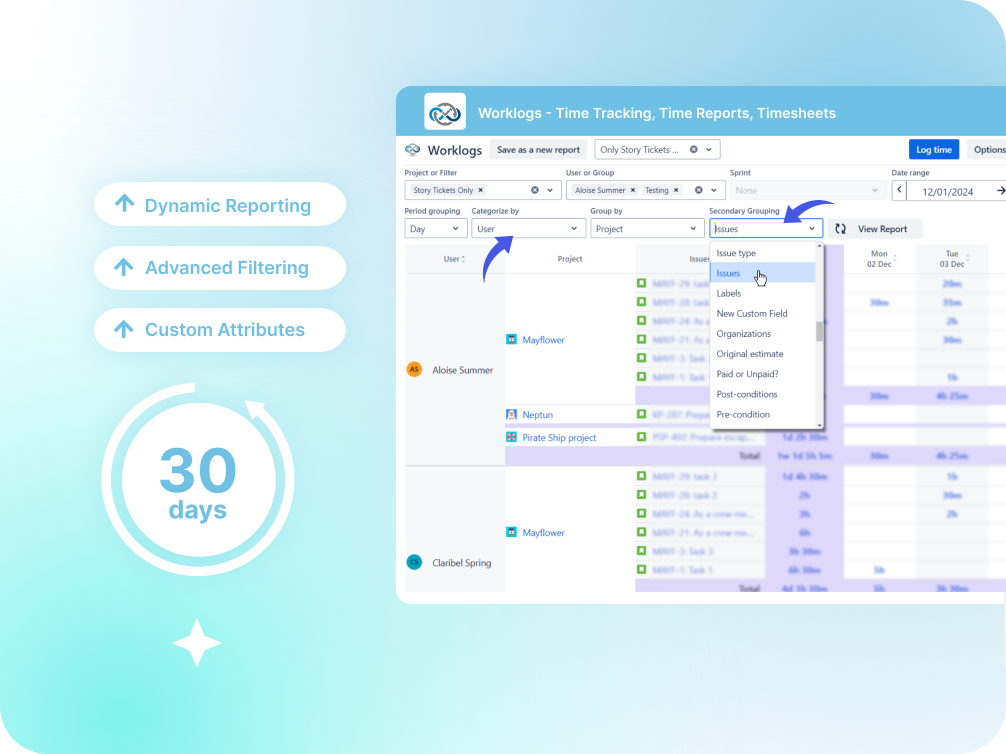
Group, categorize, and aggregate worklog data exactly the way your business needs. Start with high-level summaries and drill down to individual work logs whenever you need more detail.
Advanced Filtering
Analyze Time Data From Every Angle
Filter reports by projects, users, groups, dates, JQL filters, and custom Jira fields to uncover exactly the insights you’re looking for.

Business Reporting
Track More Than Just Hours
Go beyond basic time tracking and uncover the full picture of team effort. Analyze how work is distributed and identify trends that help teams plan more effectively.
Worklog Attributes
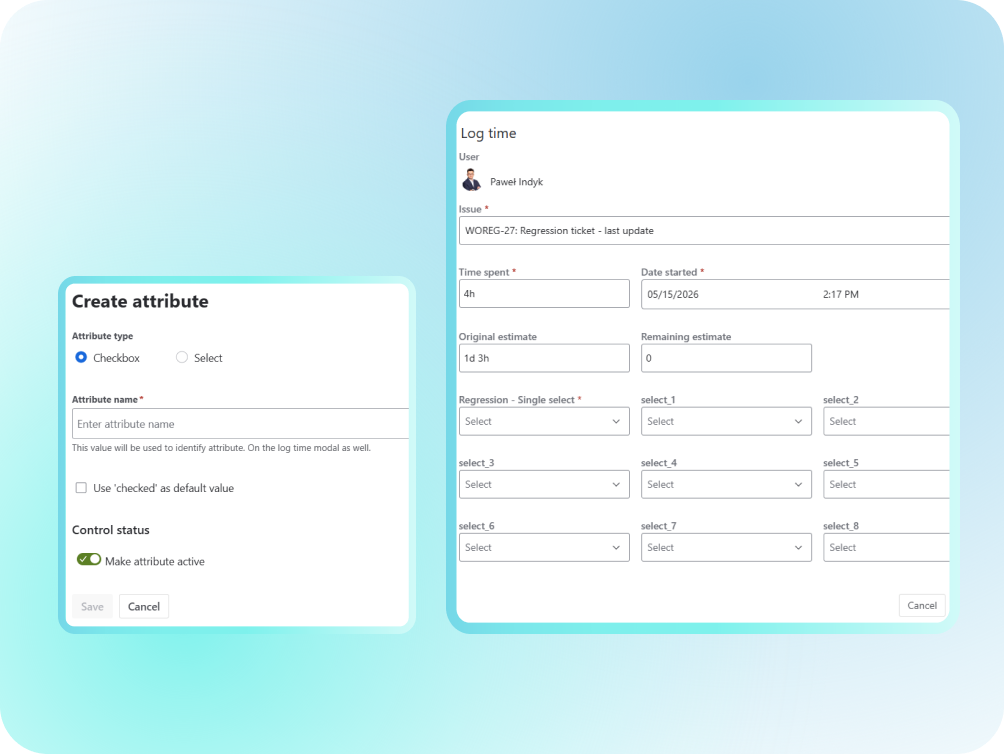
Add Business Context to Every Logged Hour
Enrich worklogs with custom attributes such as billable status, overtime, cost centers, consumers, and others to unlock deeper reporting and more accurate decision-making.
Turn Jira Worklogs Into Actionable Insights
Worklogs app helps teams collect, organize, and analyze time tracking data directly in Jira. It lets you create reports, monitor team effort, and uncover trends without exporting data into external tools.
Flexible Reporting
Build Reports Around the Questions You Need Answered
Group, categorize, and aggregate worklog data exactly the way your business needs. Start with high-level summaries and drill down to individual work logs whenever you need more detail.
Advanced Filtering
Analyze Time Data From Every Angle
Filter reports by projects, users, groups, dates, JQL filters, and custom Jira fields to uncover exactly the insights you’re looking for.

Business Reporting
Track More Than Just Hours
Go beyond basic time tracking and uncover the full picture of team effort. Analyze how work is distributed and identify trends that help teams plan more effectively.
Worklog Attributes
Add Business Context to Every Logged Hour
Enrich worklogs with custom attributes such as billable status, overtime, cost centers, consumers, and others to unlock deeper reporting and more accurate decision-making.
Turn Jira Worklogs Into Actionable Insights
Worklogs app helps teams collect, organize, and analyze time tracking data directly in Jira. It lets you create reports, monitor team effort, and uncover trends without exporting data into external tools.
Flexible Reporting
Build Reports Around the Questions You Need Answered
Group, categorize, and aggregate worklog data exactly the way your business needs. Start with high-level summaries and drill down to individual work logs whenever you need more detail.
Advanced Filtering
Analyze Time Data From Every Angle
Filter reports by projects, users, groups, dates, JQL filters, and custom Jira fields to uncover exactly the insights you’re looking for.
Business Reporting
Track More Than Just Hours
Go beyond basic time tracking and uncover the full picture of team effort. Analyze how work is distributed and identify trends that help teams plan more effectively.
Worklog Attributes
Add Business Context to Every Logged Hour
Enrich worklogs with custom attributes such as billable status, overtime, cost centers, consumers, and others to unlock deeper reporting and more accurate decision-making.
Everything You Need to Understand Team Effort
Dynamic Time Reporting
Create reports on the fly using flexible grouping, categorization, and aggregation.
Powerful and Flexible Filtering
Filter worklog data by projects, users, groups, dates, JQL, and custom Jira fields.
Custom Business Metrics
Track billable hours, overtime, and other custom reporting fields, tailored entirely to your workflow.
High Dashboard Visibility
Use Worklogs as a Jira dashboard gadget and keep critical reporting easily visible.
Interactive Multi-Level Drill-Downs
Start with high-level reports and drill down to individual projects, issues, users, and worklog entries.
Share and Export Reports
Export data and share insights with clients, managers, and stakeholders, and keep everyone aligned.
Advanced Roadmaps Reporting
Scale reporting across Jira Advanced Roadmaps and understand effort allocation in detail.
Custom User Permissions
Control who can access reports and worklog data with permissions management.
Everything You Need to Understand Team Effort
Dynamic Time Reporting
Create reports on the fly using flexible grouping, categorization, and aggregation.
Powerful and Flexible Filtering
Filter worklog data by projects, users, groups, dates, JQL, and custom Jira fields.
Custom Business Metrics
Track billable hours, overtime, and other custom reporting fields, tailored entirely to your workflow.
High Dashboard Visibility
Use Worklogs as a Jira dashboard gadget and keep critical reporting easily visible.
Interactive Multi-Level Drill-Downs
Start with high-level reports and drill down to individual projects, issues, users, and worklog entries.
Share and Export Reports
Export data and share insights with clients, managers, and stakeholders, and keep everyone aligned.
Advanced Roadmaps Reporting
Scale reporting across Jira Advanced Roadmaps and understand effort allocation in detail.
Custom User Permissions
Control who can access reports and worklog data with permissions management.
Worklogs that Adjust to Your Team's Needs
Get all the core features you need to manage your daily workflow with our Standard edition, or upgrade to Advanced to unlock deeper control over your time logs.
Worklogs
- Logging time across work items
- Flexible timesheet views
- Multi-dimensional time reporting across projects and teams
- Team workload reporting
- Jira Advanced Roadmaps reporting
- Enterprise-ready timezone reporting
- Custom worklog attributes (billable, overhours, cost center etc.)
- Multiple dashboard gadgets
- Saved reports per user
- Export to Excel and reports shareable via URL
- JQL-powered and custom field-based reporting
- Jira app access rules support
Worklogs that Adjust to Your Team's Needs
Worklogs
- Logging time across work items
- Flexible timesheet views
- Multi-dimensional time reporting across projects and teams
- Team workload reporting
- Jira Advanced Roadmaps reporting
- Enterprise-ready timezone reporting
- Custom worklog attributes (billable, overhours, cost center etc.)
- Multiple dashboard gadgets
- Saved reports per user
- Export to Excel and reports shareable via URL
- JQL-powered and custom field-based reporting
- Jira app access rules support
Real Visibility. Better Decisions
See what teams say about using Worklogs to improve reporting, planning, billing, and resource management.
Real Visibility. Better Decisions.
See what teams say about using Worklogs to improve reporting, planning, billing, and resource management.
Outstanding app that punches above it's weight. Does exactly what it needs to do, is intuitive to use and provides access to great data, easily. Very impressed by the responsiveness of the development team to queries too. All in all a great experience – Worklogs is now built into day to day use for reporting and time management for us.
The only reason im not giving 5 stars is because i physically cannot. This is a great add-on and i use it everyday and i know a lot of my company uses it as well daily Its super handy and helpful Thank you to all ❤
We've been using the Worklogs app for about a year now, and it has become an essential part of how we manage our projects and billing. It helps us keep track of the work logged across tasks and projects, which we then use directly as input for customer invoicing. Having all that information organized and easy to access saves us a lot of time and reduces manual effort. One of the features we appreciate most is the flexibility of the reports. Being able to customize and filter the data the way we need makes it simple to generate exactly the views we use on a regular basis.
Our team relies on Worklogs daily for time tracking and reporting. It has streamlined how we capture effort, plan upcoming work, and monitor progress. The visual reports are particularly useful for both managers and team members, making planning discussions much more data-driven. It's reliable, user-friendly, and adds real value to Jira.
If you are looking for a Jira time-tracking solution that covers all key needs, such as logging time, reporting, and forecasting, without breaking the budget, Worklogs is the right choice. It delivers the same capabilities as higher-priced tools but in a much simpler and cost-effective package. Great tool for organizations of any size.
This is an excellent app. Even if multiple users have individually logged hours in the 'Time Logged' field I can track every person's time entered individually.
Excellent, Flexible Time Tracking and Reporting This app is fantastic. It integrates seamlessly and relies only on native Jira worklogs, avoiding unnecessary dependencies. It delivers all the required visibility and reporting capabilities through multiple views. It is highly customizable, simple to use, and intuitive. Highly recommended for accurate time tracking!
We have been using Worklogs in our company since we migrated from Jira Server to Jira Cloud, and I cannot imagine living without it. Thanks to the app, I have an instant overview of how much work I logged for which days (and on which tasks). The worklog table display is customizable, so I have no problem tweaking it to look the way I want, giving me what I want to see. There is great support provided for the app. Definitely recommending this one!
I have been using Worklog for a long time to manage timesheets for my team, client engagement records, and planning. I don't think there are any other apps as comprehensive as Worklog in this space. Great app with all the good features I need.
Outstanding app that punches above it's weight. Does exactly what it needs to do, is intuitive to use and provides access to great data, easily. Very impressed by the responsiveness of the development team to queries too. All in all a great experience – Worklogs is now built into day to day use for reporting and time management for us.
The only reason im not giving 5 stars is because i physically cannot. This is a great add-on and i use it everyday and i know a lot of my company uses it as well daily Its super handy and helpful Thank you to all ❤
We've been using the Worklogs app for about a year now, and it has become an essential part of how we manage our projects and billing. It helps us keep track of the work logged across tasks and projects, which we then use directly as input for customer invoicing. Having all that information organized and easy to access saves us a lot of time and reduces manual effort. One of the features we appreciate most is the flexibility of the reports. Being able to customize and filter the data the way we need makes it simple to generate exactly the views we use on a regular basis.
Our team relies on Worklogs daily for time tracking and reporting. It has streamlined how we capture effort, plan upcoming work, and monitor progress. The visual reports are particularly useful for both managers and team members, making planning discussions much more data-driven. It's reliable, user-friendly, and adds real value to Jira.
If you are looking for a Jira time-tracking solution that covers all key needs, such as logging time, reporting, and forecasting, without breaking the budget, Worklogs is the right choice. It delivers the same capabilities as higher-priced tools but in a much simpler and cost-effective package. Great tool for organizations of any size.
This is an excellent app. Even if multiple users have individually logged hours in the 'Time Logged' field I can track every person's time entered individually.
Excellent, Flexible Time Tracking and Reporting This app is fantastic. It integrates seamlessly and relies only on native Jira worklogs, avoiding unnecessary dependencies. It delivers all the required visibility and reporting capabilities through multiple views. It is highly customizable, simple to use, and intuitive. Highly recommended for accurate time tracking!
We have been using Worklogs in our company since we migrated from Jira Server to Jira Cloud, and I cannot imagine living without it. Thanks to the app, I have an instant overview of how much work I logged for which days (and on which tasks). The worklog table display is customizable, so I have no problem tweaking it to look the way I want, giving me what I want to see. There is great support provided for the app. Definitely recommending this one!
I have been using Worklog for a long time to manage timesheets for my team, client engagement records, and planning. I don't think there are any other apps as comprehensive as Worklog in this space. Great app with all the good features I need.
Worklogs - Time Tracking, Time Reports, Timesheets
Easy Onboarding
Worklogs
Easy Onboarding
FAQs
What is Worklogs - Time Tracking, Time Reports, Timesheets used for?
Worklogs – Time Tracking, Time Reports, Timesheets help teams turn Jira time tracking data into reports, timesheets, and actionable insights for project management, billing, and resource planning.
How is Worklogs different from Jira native time tracking?
Jira captures time entries, but Worklogs turns them into flexible reports, dashboards, and analytics that help teams understand how time is actually spent.
What kind of data filtering is possible with Worklogs?
You can filter your worklog data by projects, users, groups, dates, JQL filters, and custom Jira fields.
Is it possible to export my work logs?
You can easily export your worklog data and reports from Worklogs to share them with stakeholders, finance teams, or clients. Reports can be exported in common formats such as xls or CSV files.
What are Worklog Attributes?
Worklog Attributes allow you to enrich time entries with additional context such as billable/non-billable time, overtime, cost centers, consumers, and other business-specific metrics.
How does pricing work?
Worklogs uses standard Jira Marketplace per-user pricing and scales with your team size.
What are your security measures or certifications?
SolDevelo is ISO 9001 and ISO 27001 certified. Additional details on privacy and security are available on the app’s marketplace page.
Service and Compliance
Worklogs - Time Tracking, Time Reports, Timesheets
Service and Compliance
Worklogs - Time Tracking, Time Reports, Timesheets
Don't just collect time data. Use it.

Don't Just Collect Time Data. Use It.
Transform Jira worklogs into reports, timesheets, and actionable insights that help teams plan better, allocate resources more effectively, and make informed business decisions.

Resources

Time reports
How to Generate Jira Time Tracking Reports by Specific User?
Generate detailed reports that showcase the logged time per user. Use filtering and grouping to gain insights into different aspects of your team’s work.

Project management
How to Track, Analyze, and Improve Team Productivity in Jira?
To make the most of your team’s time, you need to understand both how it’s being used and where it’s being lost. Here’s how you can achieve that.

Time tracking
How to Improve the Quality of Logged Time in Your Team?
Learn what makes time tracking high quality, how to achieve it, and how it can enhance team productivity and management efficiency.